
Home run
Every outlet has its own cable back to the comms room. Simple to test and to fault find, and still my default for fixed desks.
I design copper cabling to last twenty years: the right category, the 100 m rule, routes across the floor, records that stay true, and tests that prove every link. This page teaches twisted pair from the basics up, with RJ45 (registered jack 45) pinouts, PoE (Power over Ethernet), coax and the other copper still found in buildings, and tools to try.
An Ethernet cable holds four pairs of thin copper wires, twisted together. The twist is not decoration: it is what lets a cable carry gigabits past power cables and fluorescent lights without the data turning to noise. Everything else on this page builds on that idea.
Swipe sideways to see the whole diagram.
Every pair carries the signal and its mirror. Noise from a power cable, a motor or a fluorescent fitting lands on both wires at once, so it cancels at the receiver. Each pair has a different twist rate, which keeps the pairs from coupling with each other.
Twisting deals with most noise. Screens add more protection, but only when they are earthed properly at the patch panel. A screen that is not earthed can make things worse, because it acts as an aerial. I choose unscreened cable for most offices, and screened cable near heavy electrical noise or where alien crosstalk between bundled 10G links is a risk. The naming follows ISO/IEC 11801, the international cabling standard from ISO (the International Organization for Standardization) and IEC (the International Electrotechnical Commission). The letters before the slash describe the overall screen, the letters after it describe each pair. U means unscreened, F means foil and S means braid, and TP is twisted pair. So U/UTP (unscreened twisted pair) has no screen at all.
| Name | Overall screen | Pair screen | Where it is used |
|---|---|---|---|
| U/UTP | None | None | Most office cabling. Light, flexible and simple to terminate. |
| F/UTP | Foil around all four pairs | None | Common for Cat6A where noise or alien crosstalk is a concern. The foil must be earthed at the panel. |
| U/FTP | None | Foil around each pair | Good pair to pair isolation. Often used for Cat6A in data centres and industrial sites. |
| S/FTP | Braid around all four pairs | Foil around each pair | Cat7 and Cat7A. Heavier and stiffer, with the best noise rejection. |
| SF/UTP | Braid and foil together | None | Older screened designs, still found in some industrial and broadcast cabling. |
| Part | Typical conductor | Why it matters |
|---|---|---|
| Installed cable, Cat5e | 24 AWG (American wire gauge), solid copper | Solid conductors keep their shape in an IDC (insulation displacement connector) and give the lowest loss. |
| Installed cable, Cat6 and Cat6A | 23 AWG, solid copper | Thicker copper means lower resistance, which helps PoE (Power over Ethernet) run cooler. |
| Patch cords | 24 to 26 AWG, stranded | Stranded copper survives bending. Thin 28 AWG cords save space but lose more signal, so they count for more length. |
| CCA (copper clad aluminium) | Aluminium with a copper skin | Not a recognised cable. It breaks when flexed, runs hot with PoE and fails certification. I reject it on site. |
Gauges are typical. The datasheet for each cable is the source I design from.
Every cable is tested to a category, which sets the frequencies it must carry cleanly. TIA (the Telecommunications Industry Association) in North America calls them categories. ISO/IEC 11801, used in the UK and Europe, calls the installed link a class. The current TIA cabling standard for twisted pair is ANSI/TIA-568.2-E, approved by ANSI (the American National Standards Institute) and released in October 2024.
Swipe sideways to see the whole diagram.
Cat5e, Class D, 100 MHz. Still the most installed cable in older offices. It carries 1000BASE-T to 100 m, and the IEEE (Institute of Electrical and Electronics Engineers) standard 802.3bz added in 2016 2.5GBASE-T and 5GBASE-T over existing Cat5e and Cat6, so newer access points can run faster on old cable. I test before I promise it.
Cat6, Class E, 250 MHz. Carries 1000BASE-T and 5GBASE-T to 100 m. For 10GBASE-T, TIA TSB-155 (a Telecommunications Systems Bulletin) says it should work to 37 m, may work from 37 to 55 m depending on alien crosstalk, and needs mitigation beyond that. I only rely on it after alien crosstalk testing.
Cat6A, Class EA, 500 MHz. The cable I specify for new buildings. It carries 10GBASE-T over the full 100 m channel, and TIA recommends Category 6A or better for new installations that deliver power, because thicker copper runs cooler in bundles.
Cat7 and Cat7A, Classes F and FA, 600 and 1000 MHz. ISO/IEC 11801 categories that TIA does not recognise. The standard called for GG45 or TERA connectors, but most products use RJ45, which limits them to Cat6A performance. No Ethernet application needs more, so I do not specify them for LAN (local area network) cabling.
Cat8, Classes I and II, 2000 MHz. Built for 25GBASE-T and 40GBASE-T (IEEE 802.3bq, 2016) over a 30 m channel, server to switch in a data centre. Cat8.1 (Class I) keeps the RJ45. Cat8.2 (Class II) uses TERA or GG45. In practice fibre and DAC (direct attach copper) cables won this space.
| Category | ISO/IEC class | Bandwidth | Ethernet it carries | Channel | Where it is used |
|---|---|---|---|---|---|
| Cat5e | Class D | 100 MHz | 1000BASE-T and 2.5GBASE-T; 5GBASE-T on many links, after testing | 100 m | Existing offices |
| Cat6 | Class E | 250 MHz | 1000BASE-T to 5GBASE-T; 10GBASE-T to 37 m, or to 55 m after alien crosstalk testing | 100 m | Many offices built in the last twenty years |
| Cat6A | Class EA | 500 MHz | 10GBASE-T | 100 m | New buildings, access points, high power PoE |
| Cat7, Cat7A | Class F, FA | 600, 1000 MHz | 10GBASE-T | 100 m | Some European projects; ISO only |
| Cat8 (8.1 and 8.2) | Class I, II | 2000 MHz | 25GBASE-T, 40GBASE-T | 30 m | Data centre server links, rarely chosen |
Bandwidth is the frequency the cable is tested to, not its data rate. Ethernet squeezes several bits into each hertz with clever coding, which is why 10GBASE-T fits on a 500 MHz cable. Distances are for a channel built from parts of the same category.
Pick the speed, the length and the power. The answer gives the minimum that works and the cable I would specify for a new build.
10GBASE-T over 70 m needs Cat6A: Cat6 is only dependable to 37 m. Up to 60 W of PoE also points to Cat6A, which TIA recommends for new links that carry power.
Twisted pair Ethernet is specified over a 100 m channel. Structured cabling splits that budget into the cable that is built into the building and the cords people plug in. Getting the split right is what lets a building be recabled once in twenty years instead of every refit.
Swipe sideways to see the whole diagram.
The installed cable runs from a jack in the patch panel to the outlet at the desk. This permanent link is up to 90 m. It is the part that stays in the building for 15 to 25 years, so it is the part I specify most carefully.
Add the patch cord in the comms room and the cord at the desk and you have the channel: up to 100 m end to end, with no more than 10 m of cords in total. Ethernet is specified over the channel, so long cords eat into the cable budget.
In open plan floors I can add one consolidation point, a connection box in the ceiling or floor, so furniture moves only need a short cable re run. TIA advice is to keep it at least 15 m from the comms room, so crosstalk at the first connector stays in limits.
A MUTOA (multi user telecommunications outlet assembly) is one outlet box serving several desks with longer cords. It suits flexible spaces, but longer cords reduce the cable length allowed, so I check the channel maths each time.
Installers certify the permanent link with special adapters that leave the cords out, because cords are replaced over the years. A channel test includes the real cords and proves the exact path a device uses today.
Every outlet has its own cable back to the comms room. Simple to test and to fault find, and still my default for fixed desks.
Trunk cables run to zone boxes across the floor, with short runs from each box. It makes refits cheaper in open plan offices and suits ceiling access points and sensors.
If a desk is more than about 90 m of cable route from the comms room, I add another comms room or a small switch in a secure cabinet, with fibre back. Copper does not stretch.
The plug at the end of every Ethernet cable is an 8P8C connector, which everyone calls RJ45. The order of the eight wires follows one of two schemes in TIA-568, T568A or T568B. Get the order or the pairing wrong and a link may still light up, then fail at speed.
Swipe sideways to see the whole diagram.
T568B. The orange pair on pins 1 and 2, green on 3 and 6, blue on 4 and 5, brown on 7 and 8. Both schemes carry data equally well. What matters is that every outlet and panel on a site uses the same one.
T568A. The green and orange pairs swap places, so green is on 1 and 2 and orange on 3 and 6. A cable with T568A at one end and T568B at the other is a crossover. In structured cabling that is a fault, even though Auto MDI-X (automatic medium dependent interface crossover) ports would cope.
10 and 100 Mb/s. 10BASE-T and 100BASE-TX use two pairs: pins 1 and 2 send, 3 and 6 receive. The blue and brown pairs sit idle, which is why old installs sometimes shared one cable between two devices. I never do that today.
1 Gb/s and faster. 1000BASE-T, 2.5G, 5G and 10GBASE-T send on all four pairs, in both directions at once, with echo cancellation. Every pair must be correct. A cable that worked at 100 Mb/s with one bad pair fails at 1 Gb/s.
Which pairs carry power. Older PoE uses two pairs: Alternative A puts power on the data pairs 1, 2 and 3, 6, and Alternative B on the spare pairs 4, 5 and 7, 8. IEEE 802.3bt Types 3 and 4 use all four pairs, which halves the current in each pair and the heat.
| Part | What it is | Where I use it |
|---|---|---|
| 8P8C plug (RJ45) | Eight positions, eight contacts. RJ45 is the name everyone uses. | Patch cords and device ends |
| Keystone jack | A snap in socket terminated with an IDC punch down, rated to the cable category | Outlets, floor boxes and modular patch panels |
| Punch down block (LSA or 110) | IDC contacts on a panel or block. LSA is common in the UK and Europe, 110 in North America | Patch panel backs, voice frames |
| Field terminated plug | A plug fitted on site straight onto installed cable, with no outlet | Cameras and access points in ceilings, where TIA allows a modular plug terminated link |
| GG45 and TERA | Connectors defined for Class F and Class II, with contacts placed apart to reduce crosstalk | Rare. I have not needed them for LAN work |
| Shielded RJ45 | A metal bodied plug or jack that continues the cable screen to the panel earth | All F/UTP and U/FTP links |
I untwist no more than the connector needs, usually a few millimetres. Untwisting more is the most common reason a link fails NEXT (near end crosstalk).
One site, one scheme. I write it in the cabling specification and check it in the test reports. A mix of T568A and T568B creates crossovers.
Cable, jacks, panels and cords from one tested system, of the same category. A Cat6A cable on Cat6 jacks is a Cat6 link.
Choose the scheme at each end and add a fault. The wire map is what a cable tester shows first.
| Pin at A | Wire | Pin at B |
|---|---|---|
| 1 | white orange | 1 |
| 2 | orange | 2 |
| 3 | white green | 3 |
| 4 | blue | 4 |
| 5 | white blue | 5 |
| 6 | green | 6 |
| 7 | white brown | 7 |
| 8 | brown | 8 |
Straight through: every pin lands on the same pin at the far end, and every pair stays together. This passes the wire map.
Most of my copper work ends in an office: a comms room on each floor, a riser between floors, and a cable to every desk, access point and camera. The design is mostly about routes, space and rules, so the cabling outlasts the furniture plan.
Swipe sideways to see the whole diagram.
Fibre climbs the riser between comms rooms. Copper takes over for the last 90 m: through the ceiling to access points and cameras, and under the floor or down a pole to each desk. Frames flow both ways, and the same cable carries power to the phone and the access point.
| Space | What it holds | Cabling |
|---|---|---|
| Main comms room (equipment room) | Core switches, carrier lines, servers or links to the data centre | Backbone fibre to every floor |
| Floor comms room (telecommunications room) | Access switches, patch panels and UPS (uninterruptible power supply) | Horizontal copper to the floor, within 90 m |
| Riser | A vertical route between floors | Fibre, with copper only for short links |
| Ceiling and floor voids | Trays, baskets and floor boxes | Horizontal cable to outlets, access points, cameras and sensors |
| Work area | Desks, meeting rooms, printers and displays | Outlets and cords |
I plan two data outlets per desk as a typical baseline, plus outlets for every printer, display, access point and camera position. Spare outlets are cheap at installation and expensive later.
Cable sits in tray, basket or trunking, supported along its length, never laid on ceiling tiles. I follow the maker's minimum bend radius and leave room in the containment for the next tenant.
BS EN 50174-2, the British edition of the European standard (BS for British Standard, EN for European Norm), sets the gap between data and power cables. It depends on the cable's segregation class, from a to d, the type of containment and how many power circuits run alongside. Metal dividers reduce the gap, and crossings are at right angles.
Access points, cameras and sensors get their own outlets near the device, so a short cord connects them and a moved device does not mean a new cable.
Since July 2017, cables installed permanently in buildings have been classed under the CPR (Construction Products Regulation) by how they behave in a fire. BS 6701, the UK standard for installing telecommunications cabling, sets a minimum of Cca, s1b, d2, a2 for new work. The extra codes rate smoke (s), flaming droplets (d) and acidity of the fumes (a). I also specify LSZH (low smoke zero halogen) sheaths inside buildings.
| Euroclass | Reaction to fire, as the classes are usually described | Where it fits |
|---|---|---|
| Aca | No reaction | Non combustible cables. Rare for data |
| B1ca, B2ca | Very low and low reaction | Escape routes and high risk buildings, where the fire strategy asks for it |
| Cca | Reduced reaction | The UK minimum under BS 6701, with s1b, d2 and a2 |
| Dca | Improved reaction | Below the UK minimum |
| Eca | Basic | Below the UK minimum for permanent installation |
| Fca | Undetermined | Never in a building |
The building's fire strategy can ask for a better class than the minimum. I check it before ordering cable.
A cabling system is only as good as its records. When the schedule is right, a fault on desk 4B12 takes two minutes to trace. When it is wrong, it takes an afternoon. I treat the patching schedule like configuration: every change goes through it.
Swipe sideways to see the whole diagram.
Every patch change starts with a request, even a small one, so there is a trail. The request names the outlet, the device and what it needs, for example the voice VLAN (virtual LAN) for a new phone.
I look up the outlet in the patching schedule to find its panel port, then check which switch ports are free and already set up for the VLAN. If the record and the floor disagree, I fix the record first.
A cord of the right length runs from the panel port to the switch port, dressed into the cable managers. No long loops, no cords across the front of other equipment.
I confirm the link speed, the VLAN and, for a phone or access point, that PoE has powered it. A quick check here saves a second visit.
Both ends carry the same identifier. The outlet, the panel port and the cord all match the schedule.
The schedule is updated before the ticket closes. That is the step that keeps the records true.
| Outlet | Panel port | Switch port | VLAN | Device | Last change |
|---|---|---|---|---|---|
| 4B12 | TR4.PA.12 | TR4SW1 Gi1/0/12 | 20 voice, 10 data | Phone and desktop | CHG 2041 |
| 4B13 | TR4.PA.13 | TR4SW1 Gi1/0/13 | 10 data | PC | CHG 1987 |
| 4C01 | TR4.PB.01 | TR4SW2 Gi2/0/1 | 30 wireless | Access point | CHG 2033 |
| 4C02 | TR4.PB.02 | not patched | none | Spare | none |
An example patching schedule with made up identifiers. In larger sites the same data lives in a DCIM (data centre infrastructure management) tool or NetBox, and the switch side comes from the network itself.
| TIA-606-D class | Scope | What I record |
|---|---|---|
| Class 1 | One equipment room | Panels, ports, cables and earthing |
| Class 2 | One building with several comms rooms | Class 1, plus backbone cables and firestops |
| Class 3 | A campus of buildings | Class 2, plus buildings and campus cabling |
| Class 4 | Several sites | Class 3, plus sites and links between them |
ANSI/TIA-606-D, published in 2021, is the current TIA standard for labelling and records.
My lab rack follows the same idea on a small scale: patch leads on one side, power on the other, so a trace or a change never means pulling cables across each other.
A typical scheme: blue for user data, green for voice, yellow for access points, red for security systems, grey for spares. The exact colours matter less than writing them down and sticking to them.
Cords sized to the gap, in 0.5 m steps. Short cords keep the front of the rack readable and the airflow clear.
One team owns the schedule. Anyone can request a change, but only one record is the truth.
A cable that shows a link light is not a tested cable. New cabling is certified with a field tester that measures every pair across the full frequency range of its category, and the reports go into the handover. Here is what the tester measures, in the order it measures it.
Swipe sideways to see the whole diagram.
The tester checks that all eight wires connect pin to pin, and that each pair stays together. Opens, shorts, reversed pairs, crossed pairs and split pairs all fail here, before any frequency test runs.
A pulse goes down the cable and its echo comes back. With the NVP (nominal velocity of propagation) of the cable set in the tester, the round trip time gives the length. The limit is 90 m for a permanent link.
The signal gets weaker along the cable, more at high frequencies, over long runs and in hot ceilings. The tester sweeps the full frequency range of the category and compares the loss to the limit at every point.
NEXT (near end crosstalk) is signal from one pair leaking into another at the end where it is strongest. Poor termination is the usual cause. The tester also measures PS NEXT (power sum), the leak from all three other pairs together.
Any change in impedance, such as a crushed cable or an untwisted joint, reflects some signal back to the sender. Too much reflection corrupts the data, especially at 1 Gb/s and above where pairs send both ways at once.
Every measurement inside its limit is a pass. Some testers mark a result that passes by less than their own measurement accuracy with an asterisk. I treat a starred pass as a link to look at again before handover.
| Test | What it measures | What a fail usually means |
|---|---|---|
| Wire map | Each wire lands on the right pin and pairs stay together | Bad termination, crossed or split pairs |
| Length | Physical length from the signal delay | Runs over 90 m, cable coiled in the ceiling |
| Insertion loss | Signal lost along the link, across the frequency range | Too long, wrong cable, hot environment, thin cords |
| NEXT and PS NEXT | Crosstalk between pairs at each end | Untwisted pairs at the jack, mixed categories |
| ACR-F (attenuation to crosstalk ratio, far end) and PS ACR-F | Crosstalk at the far end, compared with the signal that arrives | Poor cable or connectors |
| Return loss | Signal reflected by impedance changes | Crushed or kinked cable, poor terminations |
| Propagation delay and delay skew | Time for the signal to arrive, and the spread between pairs | Mixed cable types in one link |
| DC (direct current) resistance and resistance unbalance | Resistance of each wire, and the difference within and between pairs | Poor contacts. It matters for PoE, and TIA-568.2-E now applies it to Cat5e, Cat6 and Cat6A |
| Alien crosstalk (PS ANEXT, PS AACR-F) | Noise from neighbouring cables in a bundle | 10GBASE-T over Cat6, tightly bundled Cat6A |
| Tester | What it does | When I use it |
|---|---|---|
| Certifier | Measures every parameter against a standard limit, such as a Cat6A permanent link, and stores a report per link | Handover of new cabling, and the maker's warranty |
| Qualifier | Proves a link can carry an application, such as 1000BASE-T, without full certification | Moves, adds and changes, and fault finding |
| Verifier | Checks continuity and wire map only | Quick checks while terminating |
I ask for 100 percent of links to be certified, with the reports in the handover pack. Sampling misses the one bad outlet under the chief executive's desk.
Each report names the link, the standard limit, the cable NVP, the adapter type and the tester's calibration date. A pass against the wrong limit is not a pass.
Most cabling makers offer a system warranty, typically 25 years, when certified installers use their parts throughout and submit test results. It is worth having, so I make it part of the specification.
PoE (Power over Ethernet) lets the switch power phones, access points, cameras and even lights through the data cable. It saves an electrician at every device, and it means one UPS in the comms room keeps the phones working in a power cut. It also turns the cable plant into a power system, with budgets and heat to plan.
Swipe sideways to see the whole diagram.
Before sending real power, the switch puts a few volts on the pairs and looks for a 25 kΩ signature resistor in the device. A laptop or an old phone without one gets no power, so PoE is safe on any port.
The device then shows its class, from 0 to 8. The class tells the switch the most power the device may draw, and the switch reserves that much from its budget.
The switch turns on power at around 50 V DC, on two pairs for Types 1 and 2, or on four pairs for the higher classes of Types 3 and 4.
Once the device boots it can ask for an exact figure over LLDP (Link Layer Discovery Protocol), or CDP (Cisco Discovery Protocol) on Cisco gear. The switch can then reserve less than the class maximum, which frees budget for more devices.
The switch keeps checking that the device still draws a small current. When someone unplugs it, the power stops at once, so the bare cable is never left live.
In the standard the switch is the PSE (power sourcing equipment) and the phone, camera or access point is the PD (powered device). Four standards have raised the power over time, and each device announces a class that tells the switch how much to reserve.
| Standard | Type | Classes | At the switch (PSE) | At the device (PD) | Pairs |
|---|---|---|---|---|---|
| IEEE 802.3af (2003) | Type 1 | 0 to 3 | 15.4 W | 12.95 W | Two |
| IEEE 802.3at (2009) | Type 2 | 4 | 30 W | 25.5 W | Two |
| IEEE 802.3bt (2018) | Type 3 | 5 and 6 | 45 W and 60 W | 40 W and 51 W | Four |
| IEEE 802.3bt (2018) | Type 4 | 7 and 8 | 75 W and 90 W | 62 W and 71.3 W | Four |
Power at the device is lower than at the switch because some is lost as heat in the cable. Cisco UPOE (Universal Power over Ethernet) gives up to 60 W per port and UPOE+ up to 90 W, in line with Types 3 and 4.
| Device | Class, typical | Note |
|---|---|---|
| IP (Internet Protocol) phone | Class 1 to 3 | A colour screen and sidecar push it up |
| Wi-Fi 6 access point | Class 4 | Full features may need more on some models |
| Wi-Fi 6E and Wi-Fi 7 access points | Class 4 to 6 | Check the datasheet: some run reduced radios on class 4 |
| Fixed IP camera | Class 2 to 3 | Infrared lighting at night adds load |
| PTZ (pan, tilt, zoom) camera with heater | Class 5 to 8 | Outdoor units in winter draw the most |
| Thin client, small display, LED (light emitting diode) lighting | Class 4 to 8 | Often the reason a switch runs out of budget |
Typical ranges only. The device datasheet sets the class, and some devices change their features when they get less power than they ask for.
Power in a cable turns into heat, and a cable in the middle of a tight bundle cannot lose it. Hot cable has more insertion loss, so a link can pass at handover and fail in a warm ceiling with high power PoE. TIA TSB-184-A and Annex H of ANSI/TIA-568.2-E give the guidance I design to. Use Category 6A or better for new links that carry power, with a maximum ambient of 45 °C and cable rated to at least 60 °C. Keep 26 AWG and thinner cords out of conduit, and split large bundles rather than combing them into tight looms.
A switch shares one PoE budget across all its ports. Enter the budget from the switch datasheet and the devices you plan to connect. The tool reserves the class maximum for each device, as a switch does before LLDP refines it.
Fits with room to spare. I keep at least 20 percent of the budget free, so a power supply failure or a new access point does not leave ports dark.
! Catalyst IOS XE: what each port is drawing and the budget left
show power inline
show power inline gigabitEthernet1/0/12 detail

! Fix the allocation for a device that does not report its needs well
interface gigabitEthernet1/0/12
 power inline static max 30000

! Turn PoE off on a port that should never supply it
interface gigabitEthernet1/0/24
 power inline never

! Let devices ask for an exact wattage over LLDP
lldp run
For the stage, a mixer and its stagebox link over shielded Cat5e; see my live sound page.
Coaxial cable still runs through most buildings: television and satellite feeds, older CCTV (closed circuit television), antenna feeders and the SDI (serial digital interface) video cables in studios and event spaces. The key number is impedance, 75 Ω for video and TV, 50 Ω for radio, and parts from the two never mix.
Swipe sideways to see the whole diagram.
RG6, 75 Ω. The cable behind television aerials, satellite dishes and cable broadband. It has a thicker centre conductor than RG59, so it loses less at the high frequencies satellite and DOCSIS (Data Over Cable Service Interface Specification) use. F connectors screw on and must be fitted with the right tool.
RG59, 75 Ω. Thinner and more flexible, the classic CCTV cable. High definition over coax systems such as HD-TVI (high definition transport video interface) and AHD (analogue high definition) let sites upgrade cameras without recabling. New installs I build as IP cameras on PoE instead.
50 Ω coax. Radio uses 50 Ω, so antenna feeders for Wi-Fi, cellular repeaters and two way radio are 50 Ω, often thick low loss types with N connectors. Never mix 50 Ω and 75 Ω parts in one run: the mismatch reflects signal.
SDI video coax, 75 Ω. SDI carries uncompressed video and embedded audio on a single coax with BNC connectors, and runs much further than HDMI (High Definition Multimedia Interface). The distances, converters and fibre options are on my live streaming page.
| Cable | Impedance | Connector | Typical use |
|---|---|---|---|
| RG6 | 75 Ω | F connector | TV aerial and satellite distribution, and cable broadband (DOCSIS) |
| RG59 | 75 Ω | BNC | CCTV over coax, including high definition over coax systems such as HD-TVI and AHD |
| RG58 and low loss feeders | 50 Ω | BNC, N or SMA | Radio and antenna feeders, test leads, and old 10BASE2 Ethernet |
| SDI video coax | 75 Ω | BNC, 75 Ω | Broadcast video from 3G to 12G SDI between cameras and switchers |
Coax carries one signal on a centre conductor inside a screen. Twisted pair carries a balanced signal on a pair. Coax suits high frequencies and long video runs, and twisted pair suits Ethernet and power, which is why most new buildings use twisted pair for nearly everything and keep coax for TV, radio and broadcast video.
Video coax for SDI, and how far each grade reaches, is on my live streaming page.
Not every copper cable in a building carries Ethernet. Console cables, telephone pairs, building control buses and audio visual links all share the same routes, and they turn up in surveys and refits.
| Cable | Connector | What it carries | What I watch for |
|---|---|---|---|
| Console cable (rollover) | RJ45 to DB9 serial, or a USB (Universal Serial Bus) adapter | Out of band access to Cisco routers and switches, at 9600 baud by default | Kept in every comms room. A console server gives remote access to every port |
| USB console | USB mini B or USB C on the device | Console on newer Catalyst switches | Needs the right driver on the laptop |
| Telephone cable (CW1308) | IDC blocks and BT style sockets | Analogue lines, alarm diallers and lift phones | The UK is moving landlines to digital voice, so I check what still depends on copper lines |
| RS-485 twisted pair | Screw terminals | BACnet MS/TP (master slave token passing) and Modbus RTU (remote terminal unit) in building systems | Daisy chained, with termination at each end of the bus |
| HDBaseT over Cat6A | RJ45 | Video, audio, control and power to displays, up to 100 m | More on my audio visual (AV) over IP page |
| Balanced audio | XLR and TRS (tip, ring, sleeve) | Microphones and line level audio | More on my live sound page |
A console port is the way in when the network is broken. My lab has a terminal server with console lines to every router and switch, so I can reach any device even when routing fails.
Heating, lighting and access control often run on their own copper buses. When I bring them onto the IP network, I segment them as operational technology. More on my operational technology page.
Meeting rooms and event spaces mix twisted pair, coax and audio cable. Video over Cat6A needs the same care as 10G Ethernet: certified links and short, good quality cords.
Layer 1 faults are the first thing to rule out and often the last thing people check. I work along the link from the cheapest part to swap to the dearest to replace: cords first, then jacks, then the installed cable. Choose a symptom to see where it usually sits and how I prove it.
Swipe sideways to see the whole diagram.
No link light. I start at the cheap end: swap both cords, then check the port is up with show interfaces status. If it is not disabled and still dark, a verifier on the permanent link finds the open wire. A patch to the wrong panel port is common, so I check the schedule too.
Link up at 100 Mb/s instead of 1 Gb/s. Fast Ethernet needs two pairs, gigabit needs four. When one wire in the blue or brown pair is open, many devices fall back to 100 Mb/s instead of failing. A wire map finds it, and a re termination fixes it.
CRC (cyclic redundancy check) errors rising. Frames arrive damaged. I compare the counters over a few minutes. Usual causes are a damaged cord, a poor termination or cable run tight against power. Late collisions instead point to a duplex mismatch, which is a setting, not a cable.
10G links drop on Cat6. Beyond 37 m, Cat6 only carries 10GBASE-T if alien crosstalk from the neighbouring cables is low enough. The fix is a Cat6A link, or letting a multigigabit port settle at 5 Gb/s, which Cat6 carries to 100 m.
A PoE device keeps rebooting. I check show power inline for the budget and the class the device asked for. A switch out of budget, a device that needs more than its class, or resistance in a poor joint can all drop power. Hot bundles make the last one worse.
The link drops when someone moves the desk. Nearly always the desk cord or the outlet jack: a broken clip, a crushed cord or a loose termination. I replace the cord first, then re terminate the jack, and fit cords with enough slack and strain relief.
A desk lands on the wrong network. The cable is fine, the patch or the port is wrong. I find the device MAC (media access control) address on the switch, check that port's VLAN, and compare with the schedule. Then I fix the patch and the record in the same change.
A new link fails NEXT at certification. The tester's crosstalk analysis shows the distance to the problem, and it is almost always at a jack where the pairs were untwisted too far. Re terminating that end fixes it. I watch the first few terminations of every installer for this.
! Catalyst IOS XE: port state, speed and duplex for every port
show interfaces status

! Errors on one port, and the counters across the switch
show interfaces gigabitEthernet1/0/12
show interfaces counters errors

! Built in cable test: distance to an open or short, pair by pair.
! The link drops while it runs, so I warn the user first.
test cable-diagnostics tdr interface gigabitEthernet1/0/12
show cable-diagnostics tdr interface gigabitEthernet1/0/12

! Which device is on the port, and on which VLAN
show mac address-table interface gigabitEthernet1/0/12
show lldp neighbors gigabitEthernet1/0/12 detail

! PoE budget and per port draw
show power inline
The switch tells me a lot before I pick up a tester: whether the link is up, at what speed, with what errors, and where an open wire is. The general method I use for any fault is on my troubleshooting page, and every acronym here is in the glossary.
Copper is the layer every project stands on, from my own rack to data centre builds. These are the places it has mattered most.
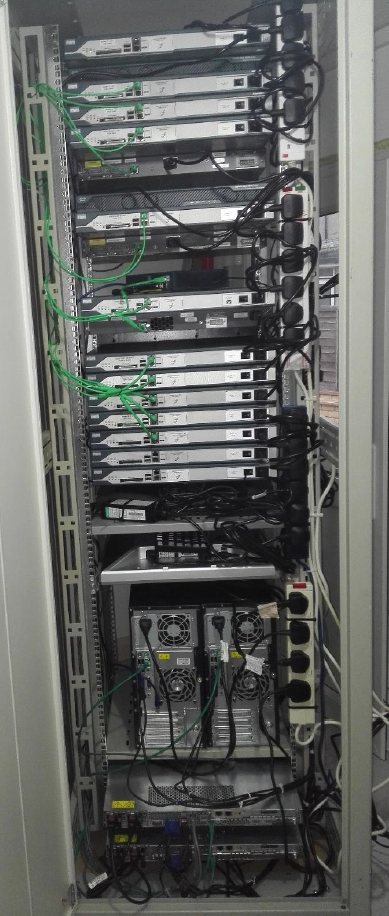
My lab rack holds Cisco 2811 routers, 3750 and 3560G switches and HP servers, all patched by hand. The 3750 PoE access switches at each site serve the IP phones. See the rack.
Training in fibre and copper structured cabling, which I use when I specify, review and accept cabling designs and test results.
The £25M Network Rail data centre build, covering structured cabling, building management systems and mechanical and electrical integration.
Prepared data centre infrastructure for high performance workloads: rack allocation, structured cabling pathways and deployment coordination.
LAN, WAN (wide area network) and cloud for multi site real estate and construction, with BACnet/IP building automation and IoT (internet of things) sensor networks.
LAN, WAN, VoIP (voice over IP), virtualisation and security across the group, including the warehouse and cold chain systems at the food depots.
Backed by my Fibre and Copper Cabling training, and CCNA (Cisco Certified Network Associate) and CCNP (Cisco Certified Network Professional) Routing and Switching. Fibre has its own page: fibre optics. See all credentials
Every page follows the same idea: how it works, the choices that matter, and where I have used it. The foundations pages explain the basics the others build on.